
Not sure which Shopify theme to choose in 2026? Compare free and premium themes by speed, design and conversions. Complete guide by Apex Shopify Agency.
Why Your Shopify Theme Choice Matters in 2026
Your Shopify Theme is far more than just a visual design — it is the foundation of your entire store’s performance, user experience, and sales potential.
In 2026, online shoppers are more impatient than ever. Research shows that 40% of visitors abandon a store that takes more than 3 seconds to load. Your theme directly controls that load time.
Beyond speed, your theme shapes:
- First impressions — visitors judge your store within 0.05 seconds
- Mobile experience — over 70% of Shopify traffic comes from mobile devices
- Conversion rate — poor UX design directly kills sales
- SEO rankings — Google ranks fast, mobile-optimized stores higher
- Brand trust — a professional Shopify Theme builds instant credibility
Choosing the wrong theme means losing customers before they even see your products. Choosing the right one sets the foundation for long-term growth.
What is a Shopify Theme?
A Shopify Theme is a pre-built design template that controls the complete look, layout, and structure of your online store — from your homepage and product pages to your checkout flow and navigation menus.
Think of it as the skin and skeleton of your store combined. It determines:
- How your homepage is structured and displayed
- How products and collections are presented
- How customers navigate through your store
- How your checkout page looks and feels
- How your store renders on mobile devices
Every Shopify Theme in the official theme store is built using Shopify’s Liquid templating language — making them dynamic, mobile-responsive, and deeply integrated with Shopify’s eCommerce features.
Themes range from free options built by Shopify itself to premium third-party themes costing $150–$500. Both can power successful stores — the difference lies in features, flexibility, and conversion potential.
What is Shopify 2.0 and Why Does It Matter?
Shopify 2.0 is the most significant platform upgrade in Shopify’s history — and it completely changed how every Shopify Theme is built and customized.
Launched to give merchants more flexibility, Shopify 2.0 introduced:
- Sections everywhere — drag-and-drop content blocks on every page, not just the homepage
- App blocks — apps integrate directly inside the theme editor without touching code
- JSON templates — faster, more flexible page structure for developers
- Metafields support — add custom data to products, collections, and pages easily
- Improved performance — cleaner code structure for faster load times
Before 2.0, customizing a Shopify Theme required developer knowledge. Now store owners control layouts, content blocks, and page structures visually — without a single line of code.
In 2026, every recommended theme in this guide is fully Shopify 2.0 compatible — ensuring maximum flexibility, performance, and future-proof design.
What to Look for When Choosing a Shopify Theme
Choosing the right Shopify Theme goes far beyond picking something that looks attractive. Here are the seven critical factors every store owner must evaluate.
Mobile-First and Responsive Design Over 70% of Shopify traffic comes from mobile. Your theme must look perfect and load fast on every screen size automatically.
Page Speed and Core Web Vitals Google ranks fast stores higher. Always check PageSpeed scores before committing to any theme — aim for above 85 on mobile.
Customization Flexibility Choose a theme with enough sections and layout options to build your unique brand without hiring a developer for every change.
Built-In Conversion Tools Look for sticky add-to-cart buttons, quick-buy overlays, countdown timers, trust badges and upsell sections built natively into the theme.
Industry and Niche Fit A fashion store needs lookbook layouts. An electronics store needs spec tables. Always match your Shopify Theme to your specific product type.
Support, Updates and Compatibility Choose themes that receive regular updates, Shopify 2.0 compatibility and dedicated developer support for long-term stability.
App Compatibility and Scalability Your theme must integrate smoothly with SEO, email marketing, review and analytics apps without conflicts or performance issues.
Why You Should Not Stick With the Default Shopify Theme
The default Shopify Theme is designed to be safe, neutral, and broadly usable — perfect for launching quickly but not built to maximize your specific store’s performance.
Sticking with the default creates hidden limitations:
- Generic layouts — no differentiation from thousands of other stores using the same design
- Limited merchandising depth — basic collection pages with minimal selling power
- Poor niche fit — one-size-fits-all design never optimizes for your specific product type
- Weak brand identity — customers cannot distinguish your store from competitors
- Missing conversion features — no sticky cart, countdown timers or advanced upsell sections
- Limited customization — creative walls appear quickly as your catalog grows
The default Shopify Theme is built to simply work — not built to sell.
Upgrading your theme means aligning your storefront with how modern shoppers actually browse, compare, and make purchase decisions in 2026.
Best Free Shopify Themes in 2026
Free does not mean inferior. Shopify’s free Shopify Theme options are built and maintained by Shopify itself — optimized for speed, performance and Shopify 2.0 compatibility.
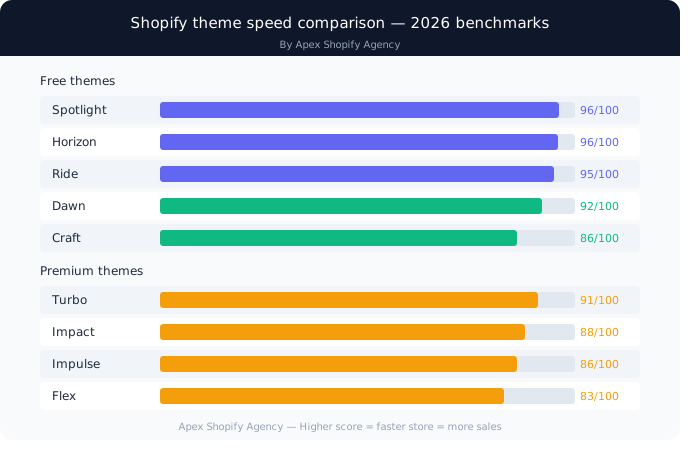
Dawn — Best All-Around Free Theme Minimalist, fast and highly adaptable. PageSpeed score 92/100. Perfect for any niche launching on a budget.
Spotlight — Best for Single Product and Small Catalogs Built for fast launches. Desktop LCP 0.8 seconds — one of the fastest themes available. Ideal for focused product brands.
Horizon — Best for Fashion and Apparel Editorial layouts, large media sections and advanced collection filters. Desktop LCP 0.9 seconds. Perfect for fashion brands.
Sense — Best for Beauty and Wellness Layered visuals, testimonial sections and benefit-led layouts designed specifically for skincare and wellness brands.
Ride — Best for Sports and Electronics Spec tables, comparison blocks and sticky add-to-cart. Desktop LCP 0.9 seconds. Built for technical product stores.
Craft — Best for Handmade and Boutique Brands Immersive galleries and storytelling sections. Desktop LCP 1.1 seconds. Elevates handmade and premium products beautifully.
Taste — Best for Food and Lifestyle Brands Bold color blocks, dynamic layouts and mobile-optimized navigation. Perfect for food, beverage and lifestyle brands.
Studio — Best for Creative and Digital Brands Bold typography, asymmetric layouts and gallery-like feel. Ideal for artists, designers and digital product stores.
Refresh — Best Clean and Fast General Store Theme Minimal design with quick-buy features and clean UX. Perfect for small to mid-sized general merchandise catalogs.
Every free Shopify Theme listed above is fully Shopify 2.0 compatible and requires zero licensing cost.
Best Premium Shopify Themes in 2026
Premium Shopify Theme options cost $300–$500 as a one-time purchase — but replace multiple app subscriptions and deliver significantly higher conversion potential.
Impulse — Best for Fashion and Large Catalogs Editorial design with promotional banners, lookbooks, size charts and robust filtering. PageSpeed 86/100. Perfect for fashion brands with seasonal collections.
Impact — Best for High-Volume Brands Built for stores doing $50k+ monthly. 25+ sections, animated transitions and advanced product filtering. PageSpeed 88/100. Best overall premium pick.
Turbo — Best for Speed-Critical Stores Fastest premium Shopify Theme available — PageSpeed 91/100. Predictive search and multi-column menus make it perfect for complex navigation stores.
Empire — Best for Electronics and Multi-Category Stores Department store-inspired layout with mega menus, layered navigation and deep product hierarchies. Handles hundreds of SKUs effortlessly.
Flex — Best for Maximum Customization 28 sections and 13 pre-built layouts — most customizable premium theme available. PageSpeed 83/100. Perfect for brands wanting complete creative control.
Booster and Debutify — Best for Conversion-Focused Stores Built-in countdown timers, sticky carts, trust badges and upsell tools — all without extra apps. Perfect for dropshipping and high-growth stores.
Free vs Premium Shopify Themes — Which Should You Choose?
Choosing between a free and premium Shopify Theme is not just about budget — it is about your business stage, growth goals and conversion requirements.
Benefits of Free Shopify Themes
- Zero upfront cost — every budget can afford it
- Built and maintained by Shopify — always updated
- Excellent speed scores — Dawn scores 92/100
- Full Shopify 2.0 compatibility included
- Perfect for new stores validating product-market fit
Benefits of Premium Shopify Themes
- Advanced built-in conversion tools — no extra apps needed
- More sections and layout options — greater creative freedom
- Niche-specific design — built for your exact industry
- Replaces 3+ app subscriptions — saves $45–$180 annually
- Dedicated developer support and frequent updates
Free vs Premium Shopify Themes — Quick Comparison Table
| Factor | Free Theme | Premium Theme |
| Cost | $0 | $300–$500 one-time |
| Speed Score | 88–92/100 | 83–91/100 |
| Conversion Tools | Basic | Advanced built-in |
| Customization | Good | Excellent |
| Best For | New stores | Scaling stores |
| Support | Shopify team | Dedicated developer |
Simple rule — under $5k monthly revenue, choose a free Shopify Theme. Above $10k monthly, premium themes deliver clear ROI through conversion lift alone.
Shopify Theme Speed and Performance Comparison
Speed is the most underrated factor in any Shopify Theme decision — directly impacting SEO rankings, bounce rates and revenue.
Speed and Core Web Vitals — Why They Matter Research shows a 0.1-second speed improvement drives 8.4% higher conversions. Google uses Core Web Vitals — LCP, CLS and INP — as direct ranking factors. Your theme controls all three.
Free Theme Speed Scores — 2026 Benchmarks
| Theme | Desktop LCP | Mobile Score |
| Spotlight | 0.8s | 90/100 |
| Horizon | 0.9s | 89/100 |
| Ride | 0.9s | 88/100 |
| Craft | 1.1s | 86/100 |
| Dawn | 2.1s | 93/100 |
| Taste | 2.4s | 79/100 |
Premium Theme Speed Scores — 2026 Benchmarks
| Theme | PageSpeed Score | Best For |
| Turbo | 91/100 | Speed-critical stores |
| Impact | 88/100 | High-volume brands |
| Be Yours | 87/100 | Multi-purpose stores |
| Impulse | 86/100 | Fashion brands |
| Flex | 83/100 | Maximum customization |
Always test any Shopify Theme on Google PageSpeed Insights before installing — real-world scores vary based on apps and custom code added.
How Your Shopify Theme Impacts SEO and Conversions
Your Shopify Theme is not just a design decision — it is an SEO and revenue decision that affects every visitor who lands on your store.
SEO and Search Visibility Your theme controls site structure, heading hierarchy, image loading behavior and internal linking patterns — all direct SEO ranking factors. A well-coded theme delivers:
- Clean semantic HTML structure
- Mobile-optimized pages Google prioritizes
- Fast load times that reduce bounce rate
- Schema markup support for rich snippets
Speed and Page Performance Every second of delay costs sales. A theme with bloated code, unoptimized images and excessive JavaScript directly hurts your Core Web Vitals score — pushing your store down in search rankings consistently.
Conversions and User Experience The right Shopify Theme guides customers naturally toward purchase through:
- Clear visual hierarchy and CTA placement
- Sticky add-to-cart buttons always visible
- Trust badges reducing checkout hesitation
- Mobile-first layouts reducing friction
- Quick-buy features shortening purchase path
Best Shopify Themes by Industry in 2026
Choosing a Shopify Theme by industry is smarter than choosing by feature list alone. Here are the top picks by category.
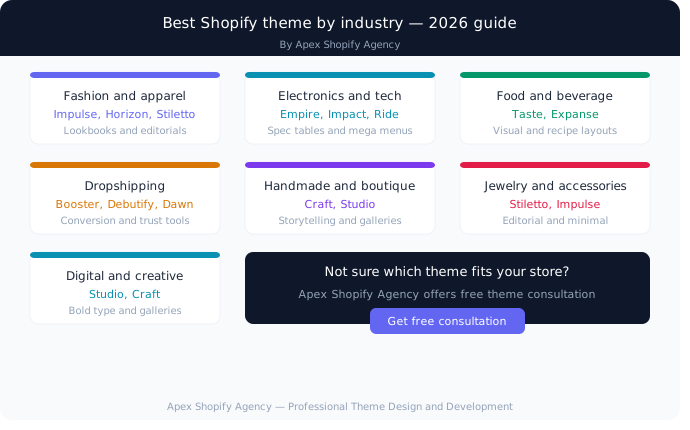
Fashion and Apparel Stores Impulse, Horizon and Stiletto — lookbook layouts, color swatches, size guides and editorial imagery sections built specifically for fashion brands.
Electronics and Tech Stores Empire, Impact and Ride — spec tables, mega menus, layered navigation and comparison sections handle large technical catalogs effortlessly.
Food and Beverage Brands Taste and Expanse — appetizing visual layouts, ingredient sections, recipe blocks and subscription-friendly product pages built for F&B brands.
Dropshipping and General Stores Booster, Debutify and Dawn — conversion tools, trust badges, urgency features and fast load times perfect for testing products rapidly.
Handmade and Boutique Brands Craft and Studio — immersive galleries, generous whitespace and storytelling sections that elevate handmade products beautifully.
Jewelry and Accessories Stiletto and Impulse — generous image areas, minimal visual clutter and editorial layouts that make jewelry photography breathe naturally.
Digital Products and Creative Brands Studio and Craft — bold typography, asymmetric layouts and content-first design perfect for courses, downloads and creative portfolios.
Every Shopify Theme recommendation above is matched specifically to how customers in that niche browse, compare and make purchase decisions.
How to Evaluate a Shopify Theme Before Installing
Never install a Shopify Theme based on looks alone. Follow this evaluation framework before committing to any theme.
Define Your Store Needs First List your must-have features before browsing — mega menus, product filtering, countdown timers, subscription support. Knowing your requirements prevents costly theme switching later.
Check Performance of the Demo Store Test every demo store on Google PageSpeed Insights and GTmetrix before installing. Aim for above 85 on mobile and under 2.5 seconds LCP on desktop consistently.
Review Built-In Customization Options Count available sections — aim for minimum 15 sections. Fewer options mean creative walls appear quickly as your brand evolves and grows.
Check Product and Collection Flexibility Your chosen Shopify Theme must handle your full catalog size comfortably — from 10 products today to 500 products tomorrow without structural changes required.
Validate Support and Regular Updates Check the theme’s update history and support response time. Themes without recent updates create compatibility issues with new Shopify features and app integrations.
How to Install a Shopify Theme in 2026
Installing a Shopify Theme is straightforward — follow these simple steps to get your theme live correctly.
Installing a Free Theme:
- Go to Online Store → Themes in your Shopify admin
- Click Visit Theme Store to browse available options
- Select your preferred theme and click Add to Library
- Click Customize to begin editing immediately
Installing a Premium Theme:
- Purchase your theme from Shopify Theme Store or third-party provider
- Download the theme ZIP file to your computer
- Go to Online Store → Themes → Add Theme → Upload ZIP file
- Click Upload and wait for installation to complete
- Click Customize to begin configuring your store
Important steps after installing any Shopify Theme:
- Configure colors, fonts and logo immediately
- Test all pages on mobile before going live
- Check page speed on Google PageSpeed Insights
- Connect all apps and verify compatibility
- Place a test order before launching publicly
How to Customize Your Shopify Theme for More Sales
A well-customized Shopify Theme converts significantly better than a default out-of-the-box installation. Follow these customization priorities for maximum sales impact.
Homepage Optimization:
- Place your strongest product or offer above the fold immediately
- Add trust badges — secure payment, free shipping, money-back guarantee
- Include a clear hero CTA button visible without scrolling
Product Page Optimization:
- Enable sticky add-to-cart button — always visible during scroll
- Add high-quality images from multiple angles
- Display reviews prominently near the buy button
- Include urgency elements — low stock indicators, countdown timers
Navigation and UX:
- Keep menus simple — maximum two clicks to any product
- Enable predictive search for faster product discovery
- Add announcement bar for promotions and offers
Mobile Optimization:
- Test every page on multiple screen sizes
- Ensure buttons are large enough to tap comfortably
- Compress all images for faster mobile loading
Customizing your Shopify Theme around buyer psychology — not just aesthetics — is what separates high-converting stores from average ones.
How to Switch Shopify Themes Without Losing SEO
Switching your Shopify Theme incorrectly can damage years of built SEO authority overnight. Follow this safe migration process to protect your rankings.
Before Switching:
- Document all existing meta titles and descriptions
- Screenshot current navigation structure and menus
- Record all customized sections and content blocks
- Test current page speed as your baseline benchmark
During the Switch:
- Install new theme in preview mode first — never live
- Recreate all navigation menus and footer links
- Re-enter all meta titles and descriptions manually
- Restore all image alt texts on product pages
- Reconnect all apps and verify compatibility
After Switching:
- Submit updated sitemap to Google Search Console immediately
- Test every page for broken links and missing content
- Verify mobile responsiveness across all devices
- Run Google PageSpeed test and compare with baseline
Shopify separates your product data from your Shopify Theme — meaning products, pages and blog posts remain intact. Only layout configurations need rebuilding after switching.
Common Mistakes When Choosing a Shopify Theme
Avoiding these mistakes saves you months of wasted time and costly theme migrations later.
1. Choosing Based on Looks Alone A beautiful Shopify Theme that loads slowly and converts poorly is worthless. Always prioritize speed and conversion features over aesthetics first.
2. Ignoring Mobile Performance Over 70% of traffic comes from mobile. Never choose a theme without testing its mobile speed score and layout carefully.
3. Overlooking App Compatibility Some themes conflict with essential apps — reviews, email marketing, SEO tools. Always verify compatibility before purchasing any premium theme.
4. Choosing Wrong Niche Fit A jewelry store theme on an electronics store creates friction. Always match your Shopify Theme to your specific product type and customer behavior.
5. Ignoring Section Count Themes with fewer than 15 sections limit creativity quickly. Always check available sections before committing.
6. Skipping Demo Store Testing Never install without testing the live demo on PageSpeed Insights. What looks fast in screenshots may load poorly in reality.
7. Switching Themes Too Frequently Every theme switch requires SEO reconfiguration. Choose carefully from day one — unnecessary switching damages rankings and wastes valuable development time.
Shopify Theme Selection Checklist
Use this checklist to confidently select the perfect Shopify Theme for your store without guesswork.
Performance Checklist
- PageSpeed score above 85 on mobile
- Desktop LCP under 2.5 seconds
- Core Web Vitals passing on demo store
- Minimal JavaScript footprint
Design Checklist
- Mobile-first responsive layout verified
- Minimum 15 sections available
- Niche-specific layouts included
- Brand colors and fonts fully customizable
eCommerce Checklist
- Sticky add-to-cart button available
- Quick-buy functionality included
- Product filtering and search built-in
- Trust badges and reviews supported
Technical Checklist
- Shopify 2.0 fully compatible
- All essential apps compatible
- Regular updates confirmed
- Developer support available
Business Checklist
- Free or premium decision made based on revenue stage
- Industry and niche fit confirmed
- Demo store tested on real mobile device
- Budget approved for theme and customization
Every box checked means your chosen Shopify Theme is ready to build a high-converting professional store.
Our Shopify Theme Design Services at Apex Shopify Agency
Whether you need a custom Shopify Theme built from scratch or an existing theme professionally configured — Apex Shopify Agency delivers everything under one roof.
Custom Shopify Theme Design and Development Pixel-perfect custom themes built for your specific niche — mobile-first, conversion-optimized and visually stunning from day one.
Shopify Store Setup and Configuration Complete store setup including theme installation, payment gateways, shipping zones, apps and full SEO configuration professionally handled.
Branding and Visual Identity Logo design, color palette, typography and complete brand guidelines — consistent across every page of your Shopify Theme and beyond.
Shopify SEO and Speed Optimization Full technical SEO audit, Core Web Vitals optimization, image compression and page speed improvements for better Google rankings.
Social Media Management and Paid Ads Complete social media management, content calendar, Meta and Google ad campaigns driving high-intent buyers to your store consistently.
WordPress and WooCommerce Development Professional WordPress websites and WooCommerce stores built for speed, SEO and complete business ownership without platform restrictions.
Why Choose Apex Shopify Agency for Your Shopify Store?
When it comes to building a professional Shopify Theme — choosing the right agency matters as much as choosing the right theme. Here is why businesses trust Apex Shopify Agency.
Expert Shopify Theme Designers and Developers Our certified team builds custom themes that are visually stunning, technically solid and conversion-optimized for your specific niche and audience.
Conversion-First Design Approach Every design decision we make has one goal — turning visitors into paying customers. Beautiful stores that do not convert are worthless.
Complete Branding — From Logo to Live Store We handle logo, color palette, brand guidelines and complete Shopify Theme design — delivering consistent professional identity across every touchpoint.
Transparent Pricing — No Hidden Costs Clear upfront pricing with zero surprises. You know exactly what you are paying for before we begin any work.
Dedicated Support After Launch Our relationship never ends at launch. Ongoing support, performance monitoring and growth consultation included for every client always.
Our Shopify Store Development Pricing Plans
Every Shopify Theme project at Apex Shopify Agency is priced transparently — no hidden costs, no surprises, no confusing packages.
Starter Plan — Perfect for New Stores
| Price | $299 one-time |
| Theme | Free theme setup and configuration |
| Pages | Up to 5 pages |
| Delivery | 7 days |
| Support | 30 days post-launch |
Growth Plan — Perfect for Scaling Businesses
| Price | $599 one-time |
| Theme | Premium theme setup and customization |
| Pages | Up to 10 pages |
| Delivery | 14 days |
| Support | 60 days post-launch |
Premium Plan — Perfect for Established Brands
| Price | $999 one-time |
| Theme | Custom Shopify Theme design and development |
| Pages | Unlimited pages |
| Delivery | 21 days |
| Support | 90 days post-launch |
What Is Included in Every Plan?
- Mobile-first responsive design
- Payment gateway configuration
- Basic SEO setup
- Speed optimization
- Free revision rounds
- Post-launch support
Our Shopify Store Development Process
At Apex Shopify Agency, every Shopify Theme project follows a proven five-step process that delivers professional results on time, every time.
Step 1 — Discovery and Theme Strategy Session We analyze your business, niche, audience and goals — then recommend the perfect theme and design direction confidently based on data.
Step 2 — Branding and Design Prototyping We create your complete brand identity — logo, color palette, typography and full store design prototype — all approved by you before development begins.
Step 3 — Theme Development and Configuration Full Shopify Theme development including customization, payment gateways, shipping zones, essential apps and complete SEO configuration from day one.
Step 4 — Testing and Quality Assurance Every page, link, checkout flow and mobile experience tested thoroughly across all devices and browsers before confident launch.
Step 5 — Launch and Ongoing Growth Support Your store goes live with full handover, training and documentation. Post-launch support, performance monitoring and growth consultation continue afterwards always.
Our Portfolio — Shopify Stores We Have Built
Every store below was built with a carefully selected Shopify Theme — customized professionally for maximum conversions and brand impact.
Project 1 — Fashion and Beauty Store Theme Used: Impulse Premium Challenge: Client needed a visually stunning mobile-first store with lookbook layouts and seamless checkout experience. Solution: Custom Impulse theme configuration, complete branding and product page optimization. Result: 65% increase in conversions within first 30 days of launch.
Project 2 — Home and Kitchen Store Theme Used: Dawn Free + Custom Development Challenge: Large product catalog requiring advanced filtering, organized collections and SEO-optimized category pages. Solution: Custom Shopify Theme development, speed optimization and complete Rank Math SEO setup. Result: Ranked on Google within 45 days — organic traffic doubled within 3 months.
Project 3 — Men Accessories Store Theme Used: Impact Premium Challenge: Zero brand identity, poor mobile experience and weak product pages killing conversions. Solution: Complete rebranding, custom theme redesign, Google Shopping ads and email marketing automation. Result: 3x revenue increase within 60 days of store relaunch.
What Our Clients Say About Apex Shopify Agency
Real businesses trusted Apex Shopify Agency with their Shopify Theme design — here is what they experienced after working with our team.
Client 1 — Hair Salon / London “Apex designed our complete store from scratch. The theme looks absolutely stunning on mobile and our online bookings increased 60% within the first month. Incredible team.” — Sarah Mitchell, London, United Kingdom
Client 2 — Restaurant / New York “We had no idea which theme to choose or how to set it up. Apex handled everything professionally and delivered beyond our expectations. Best investment we made this year.” — James Rodriguez, New York, United States
Client 3 — eCommerce Store / Phoenix “Apex selected the perfect Shopify Theme for our store, customized it beautifully and launched within 10 days. We hit consistent daily sales within 3 weeks of going live.” — Emily Carter, Phoenix, United States
Frequently Asked Questions
What features should I look for in a Shopify theme? Mobile responsiveness, fast page speed, built-in conversion tools, customization flexibility, niche fit and regular developer updates.
Is a free Shopify theme good enough for a high-traffic store? Yes — Dawn scores 92/100 on PageSpeed and handles high traffic excellently. Free themes are perfect until you need advanced conversion features.
Does theme choice affect SEO? Absolutely. Your Shopify Theme controls page speed, mobile usability and site structure — all direct Google ranking factors.
Can I switch Shopify themes later without losing SEO? Yes — if done correctly. Always set up 301 redirects, restore meta titles and submit updated sitemap to Google Search Console immediately.
Which free Shopify theme is fastest in 2026? Spotlight — desktop LCP 0.8 seconds. Dawn follows closely with consistently strong real-world performance scores across all devices.
Are free themes good enough for large product catalogs? For catalogs under 200 products — yes. Larger catalogs benefit from premium themes with advanced filtering and navigation capabilities.
How much do premium Shopify themes cost in 2026? Between $300–$500 as a one-time purchase. They replace multiple app subscriptions saving $45–$180 annually making ROI very strong.
How long does it take to install and customize a Shopify theme? Basic installation takes minutes. Professional customization by Apex Shopify Agency takes 7–21 days depending on complexity and plan selected.
What is the best Shopify theme for dropshipping? Booster, Debutify and Dawn — built-in conversion tools, trust badges and fast load times perfect for testing products rapidly.
Do I need a developer to customize a Shopify theme? Basic customization is manageable independently. For a professional conversion-optimized Shopify Theme — working with an expert agency delivers significantly better results.
Ready to Build Your Professional Shopify Store with Apex?
You now know exactly how to choose the perfect Shopify Theme — but knowing and executing professionally are two completely different things.
At Apex Shopify Agency we handle everything — theme selection, customization, branding, SEO and launch — so you get a professional store that converts from day one.
What You Get With Apex:
- Free theme consultation and recommendation
- Custom professional theme design
- Complete branding and visual identity
- Mobile-first conversion-optimized layout
- Full SEO and speed optimization
- Payment gateway and shipping setup
- Ongoing post-launch support
Whether you need a free Shopify Theme configured professionally or a completely custom design built from scratch — Apex Shopify Agency delivers the same world-class standard every single time.
Contact Apex Shopify Agency today — get your free theme consultation now.
Your perfect Shopify store is one conversation away.
Final Thoughts
Choosing the right Shopify Theme is one of the most important decisions you will make for your online store — and it goes far beyond picking something that looks attractive.
Your theme controls speed, SEO, mobile experience, conversion rate and brand trust simultaneously. Getting it right from day one saves months of costly migrations and lost revenue later.
The stores that succeed in 2026 are not the ones with the prettiest themes — they are the ones with the fastest, most conversion-optimized, niche-specific themes working seamlessly with a strong marketing strategy.
Whether you choose a free theme like Dawn or a premium Shopify Theme like Impact — what matters most is professional configuration, consistent branding and continuous optimization.
Do not leave your store’s foundation to chance.
Apex Shopify Agency is here to help you choose, build and grow — one store at a time.