
Want to build a professional Shopify store in 2026? Follow our complete guide covering store setup, themes, payments, apps, SEO and marketing. Start today!
Why Creating a Professional Shopify Store the Right Way Matters in 2026
Starting a Shopify store in 2026 is easier than ever — but building one that actually converts visitors into paying customers is a completely different story.
Today, over 4.9 million merchants use Shopify globally. That means competition is fierce. Simply uploading a few products and picking a free theme is no longer enough. Customers today are smarter, more impatient, and have higher expectations than ever before. If your store looks unprofessional, loads slowly, or feels confusing to navigate — they will leave within seconds and buy from your competitor instead.
This is exactly why following a Shopify Store in 2026 — Complete Guide approach matters more than ever.
What Has Changed in 2026?
Shopify itself has evolved significantly. With the introduction of Shopify Magic and AI-powered tools, store owners now have access to smarter product descriptions, automated design suggestions, and intelligent customer insights. But these tools only deliver results when your store foundation is set up correctly from day one.
Mobile commerce now accounts for over 70% of all eCommerce traffic. If your store is not optimized for mobile users, you are already losing the majority of your potential customers before they even see your products.
Google’s ranking algorithms have also become stricter. Page speed, mobile usability, structured data, and user experience signals are now direct ranking factors. A poorly configured store will struggle to appear in search results — no matter how good your products are.
Why Getting It Right from the Start Saves You Time and Money
Many store owners make the mistake of rushing their setup — only to face problems later. Broken checkout flows, wrong tax configurations, missing SSL certificates, and unoptimized product pages are all issues that hurt both sales and search rankings.
Fixing these problems after launch costs significantly more time, money, and effort than doing it right the first time.
A professionally built Shopify store delivers:
- Higher conversion rates through clean design and smooth user experience
- Better search rankings through proper SEO configuration from day one
- Stronger brand trust through consistent visuals, fast load times, and secure checkout
- Lower bounce rates through mobile-first, responsive design
- Long-term scalability through a solid technical foundation
At Apex Shopify Agency, we have helped dozens of businesses launch stores that are not just visually impressive — but built to rank, convert, and grow.
Whether you are starting from scratch or rebuilding an existing store, this Shopify Store in 2026 — Complete Guide will walk you through every step the right way — so you do not have to go back and fix costly mistakes later.
What You Need Before Setting Up Your Shopify Store
Before you dive into themes, products, or payment gateways, there is some important groundwork to cover. Skipping this preparation phase is one of the biggest reasons new Shopify stores fail within their first year. Think of it as laying the foundation before building the house — without it, everything else becomes unstable.
A successful Shopify Store in 2026 — Complete Guide always starts with three things: a validated niche, a clear target audience, and the right research tools.
Choose a Profitable Niche
Your niche defines everything — your products, your audience, your marketing, and your brand voice. Choosing the wrong niche means spending months building a store that nobody wants to buy from.
A profitable niche is not just something you are passionate about. It is a market with proven demand, manageable competition, and real buying intent. In 2026, the most successful Shopify stores are built around specific, focused audiences rather than trying to sell everything to everyone.
Popular and growing niches in 2026 include:
- Sustainable and eco-friendly products
- Personalized health and wellness items
- Pet technology and smart accessories
- Home office and productivity tools
- Digital products and downloadable resources
Choosing a focused niche makes it easier to rank on Google, connect with your audience, and build a brand that people remember and return to.
What Makes a Niche Profitable in 2026?
Not every popular niche is profitable. A niche becomes truly profitable when three conditions are met simultaneously:
1. Strong and Consistent Demand People are actively searching for and buying products in this category. Seasonal spikes are fine, but the best niches have year-round demand that provides stable revenue throughout the year.
2. Repeat Purchase Behavior Niches with consumable products — like supplements, pet food, skincare, or coffee — create repeat customers. This dramatically increases customer lifetime value (CLV) and reduces your dependency on constantly acquiring new buyers.
3. Healthy Profit Margins Some niches have high demand but razor-thin margins due to heavy competition and low pricing. Always calculate your landed cost, shipping, platform fees, and marketing spend before committing to a niche.
4. Room for Branding A profitable niche should allow you to differentiate yourself. If every competitor is selling the exact same generic product at the same price, standing out becomes almost impossible without a strong brand angle.
Which Tools Can You Use to Research Niches?
The right tools turn guesswork into data-driven decisions. Before committing to any niche for your Shopify Store in 2026 — Complete Guide journey, use these research tools:
| Tool | What It Does |
| Google Trends | Tracks search interest over time and reveals seasonal patterns |
| Ahrefs / SEMrush | Shows keyword search volume, competition level, and competitor traffic |
| Shopify Market Insights | Reveals trending products across Shopify’s global merchant network |
| Amazon Best Sellers | Identifies high-demand physical products with proven sales history |
| Etsy Trends | Great for handmade, personalized, and creative product niches |
| Meta Audience Insights | Shows audience size, demographics, and interest data for paid ads |
Combining at least two or three of these tools gives you a much clearer and more accurate picture of niche viability before you invest time and money into building your store.
How Can You Test Niche Profitability?
Researching a niche is important — but testing it before fully committing is even smarter. Here are four low-risk ways to validate your niche:
Run a Small Paid Ad Campaign Spend a small budget on Facebook or Google ads targeting your potential audience. Track click-through rates, landing page visits, and add-to-cart actions. Real data is always more reliable than assumptions.
Create a Pre-Order or Waitlist Page Build a simple landing page announcing your product and collect email signups or pre-orders. If people are willing to give you their email or money before the store is live — that is strong validation.
Launch a Limited Inventory Test Start with a small batch of products and measure actual sales velocity, return rates, and customer feedback before scaling up your inventory investment.
Analyze Competitor Activity If competitors in your niche are running consistent paid ads for months, it means the niche is profitable for them. Nobody spends money on ads that do not generate returns over an extended period.
At Apex Shopify Agency, we help our clients validate their niche and build a solid business strategy before a single line of code is written — because a well-researched foundation always leads to better results.
How to Set Up Your Shopify Account in 2026
Setting up your Shopify account is the first practical step in this Shopify Store in 2026 — Complete Guide. The process is straightforward, but making the right decisions at this stage saves you from costly problems later.
How Do You Sign Up for Shopify?
Go to Shopify.com and click Start Free Trial. Enter your email address, create a password, and choose your store name. Shopify’s 2026 onboarding wizard will guide you through basic setup automatically — including theme suggestions and payment recommendations based on your product type.
Your free trial gives you full access to explore the platform before committing to a paid plan.
Which Shopify Plans Are Available in 2026?
| Plan | Monthly Price | Best For |
| Basic | $39 | New store owners |
| Shopify | $105 | Growing businesses |
| Advanced | $399 | Scaling merchants |
| Plus | Custom | Enterprise brands |
For most beginners, the Basic plan is enough to launch and start generating sales comfortably.
Why Should You Complete Store Settings Early?
Many store owners skip basic settings and jump straight to design — this is a costly mistake. Before adding products or customizing your theme, always configure:
- Business name and address
- Currency and language
- Tax settings based on your region
- SSL certificate for secure transactions
- Refund and privacy policies
Completing these settings early ensures your store is legally compliant, builds customer trust, and prevents checkout errors that hurt conversions.
At Apex Shopify Agency, we always configure store settings properly before touching design or products — because a strong backend makes everything else run smoothly.
How to Choose Your Store Name & Configure Basic Settings
Your store name is your first impression — make it count. A strong store name should be short, memorable, easy to spell, and relevant to your niche.
In this Shopify Store in 2026 — Complete Guide, we recommend choosing a name that reflects your brand identity and is available as a domain. Avoid generic names — something unique builds stronger brand recognition.
Once your name is set, configure these basic settings immediately:
- Currency and language matching your target market
- Business address and contact details
- Store timezone for accurate order tracking
- Email notifications for orders and customers
Getting these right from day one prevents confusion later.
How to Select and Customize a High-Converting Shopify Theme
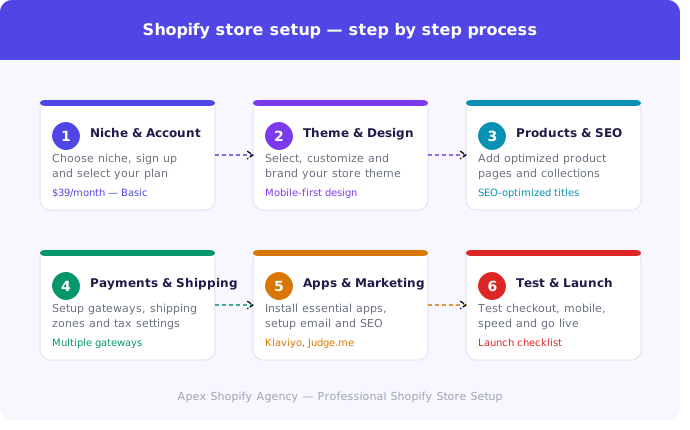
Your theme is your store’s first impression. A poorly designed theme drives customers away — no matter how good your products are. In this Shopify Store in 2026 — Complete Guide, choosing the right theme is one of the most critical decisions you will make.
How Do You Choose the Right Shopify Theme?
Choose a theme that is fast, mobile-responsive, and conversion-focused. Key factors to consider:
- Page load speed — slow themes kill conversions
- Mobile-first design — over 70% traffic comes from mobile
- Clean navigation — customers find products easily
- Built-in SEO structure — better Google rankings
Where Can You Find Shopify Themes?
Two main sources:
- Shopify Theme Store — free and paid themes ($150–$350), fully compatible and regularly updated
- ThemeForest — third-party premium themes with advanced features
For professional stores, always invest in a premium theme.
How Do You Customize a Shopify Theme?
Go to Online Store → Themes → Customize in your Shopify admin. From here you can:
- Upload your logo and brand colors
- Configure homepage layout and banners
- Add CTA buttons and trust badges
- Set up navigation menus and footer links
Why Is Theme Customization Important for Conversions?
A customized theme builds brand trust and improves user experience. Research shows that improving navigation and checkout design can increase conversion rates by up to 35%. A generic uncustomized theme looks unprofessional and reduces buyer confidence significantly.
At Apex Shopify Agency, our UI/UX designers build custom Shopify themes that are visually stunning and conversion-optimized.
How to Add Products with Optimized Descriptions
Your product pages are where visitors become buyers. Weak descriptions and poor images lose sales — no matter how much traffic you drive. This section of our Shopify Store in 2026 — Complete Guide covers exactly how to get it right.
How to Write SEO-Optimized Product Titles and Descriptions
Every product title and description should be written for both Google and your customer simultaneously.
Follow this formula:
- Title — Include main keyword + product type + key feature
- Description — Focus on benefits, not just features
- Meta description — Write a compelling 155-character summary
- Alt text — Describe every image for SEO
Avoid copy-pasting supplier descriptions — Google penalizes duplicate content and it destroys your rankings.
How to Upload High-Quality Product Images
Images directly impact purchase decisions. Best practices:
- Use white or clean backgrounds for product shots
- Upload multiple angles for every product
- Compress images before uploading for faster load speed
- Add zoom functionality so customers inspect details closely
At Apex Shopify Agency, we optimize every product page for maximum conversions and search visibility.
How to Organize Products with Collections & Navigation
A well-organized store helps customers find products faster — and faster discovery means more sales. In this Shopify Store in 2026 — Complete Guide, proper collections and navigation structure is essential for both user experience and SEO.
Collections group similar products together, making browsing intuitive. Use these collection types:
- Manual Collections — hand-pick specific products
- Automated Collections — products added automatically based on tags or price rules
- Smart Categories — “New Arrivals”, “Best Sellers”, “Sale Items”
Once collections are created, link them to your main navigation menu so customers reach any category within two clicks maximum.
For SEO, add a unique description to every collection page. Google indexes these pages separately — optimized collection pages drive significant organic traffic over time.
Keep your navigation simple, clean, and logical. Confusing menus frustrate shoppers and increase bounce rates dramatically.
How to Securely Set Up Payment Gateways
A smooth and secure checkout experience is non-negotiable. In this Shopify Store in 2026 — Complete Guide, setting up the right payment gateways directly impacts your conversion rate and customer trust.
How Do You Enable Payments in Shopify?
Go to Settings → Payments in your Shopify admin. Enable your preferred gateway and test a transaction before going live. Always ensure SSL certificate is active for secure checkout.
Which Payment Gateways Are Best for Shopify in 2026?
| Gateway | Best For |
| Shopify Payments | Global stores — supports Apple Pay, Google Pay |
| Payoneer | International buyers — widely trusted |
| Stripe | Custom checkout experiences |
| 2Checkout | Pakistan and emerging markets |
| Jazz Cash / EasyPaisa | Pakistan-based customers |
Always activate multiple gateways to reduce failed checkouts and serve international customers comfortably.
How to Configure Shipping and Taxes
Incorrect shipping and tax settings are among the top reasons customers abandon their carts. This Shopify Store in 2026 — Complete Guide ensures you configure both correctly before launch.
How Do You Set Up Shipping Options?
Go to Settings → Shipping and Delivery in your Shopify admin. Configure:
- Free shipping thresholds — example: free shipping over $50
- Flat-rate shipping — simple and predictable for customers
- Real-time carrier rates — UPS, DHL, FedEx for accurate pricing
- Local delivery or pickup — great for regional businesses
- Tax automation — enable Shopify’s built-in tax calculator based on your region
Why Are Payments and Shipping Critical to Conversions?
Research shows 48% of abandoned carts happen due to unexpected shipping costs or limited payment options. Transparent shipping rates and multiple payment methods build customer confidence and reduce drop-offs significantly at checkout.
What Shopify Apps Should Every Store Install in 2026?
Apps extend your store’s capabilities far beyond Shopify’s default features. This Shopify Store in 2026 — Complete Guide recommends installing apps by category for maximum impact.
Which Apps Improve SEO and Visibility?
- SEO Manager — meta titles, descriptions and schema markup
- Plug in SEO — detects broken links and site speed issues
- Schema Plus — enables rich snippets for better CTR
Which Apps Help With Marketing and Retention?
- Klaviyo — email and SMS automation
- Omnisend — omnichannel marketing campaigns
- PushOwl — abandoned cart web push notifications
Which Apps Manage Inventory and Fulfillment?
- DSers — dropshipping automation
- ShipStation — centralized order fulfillment
- Stocky — inventory forecasting and management
Which Apps Enhance Customer Experience and Conversions?
- Judge.me — verified customer reviews
- Tidio — live chat and chatbot support
- ReConvert — post-purchase upsell flows
How to Use Shopify Magic & AI Features in 2026
One thing that makes this Shopify Store in 2026 — Complete Guide different from older tutorials is the power of AI. Shopify Magic is Shopify’s built-in AI tool that saves hours of manual work and improves store quality significantly.
Here is what Shopify Magic can do for your store:
- AI Product Descriptions — generates SEO-optimized product copy in seconds
- Smart Image Editing — removes backgrounds and enhances product photos automatically
- AI-Powered Chatbot — handles customer queries 24/7 without human support
- Automated Email Campaigns — generates personalized email content based on customer behavior
- Intelligent Analytics — predicts sales trends and suggests inventory adjustments
In 2026, store owners who leverage AI tools consistently outperform those who do not. Shopify Magic reduces workload, improves content quality, and helps you scale faster without hiring a large team.
How to Optimize Your Shopify Store for SEO Before Launch
Most store owners think about SEO after launch — that is a big mistake. This Shopify Store in 2026 — Complete Guide strongly recommends completing SEO setup before your store goes live.
Here is your pre-launch SEO checklist:
- Meta titles and descriptions — add focus keywords to every page
- Image alt text — describe every product image for Google
- URL structure — keep URLs short, clean and keyword-rich
- Page speed optimization — compress images and remove unnecessary apps
- Mobile usability — test every page on mobile before launch
- Google Search Console — connect and submit your sitemap immediately
- Internal linking — link collections, products and blog posts together
- SSL certificate — ensure your store runs on HTTPS securely
A properly SEO-optimized store starts ranking faster and drives organic traffic from day one.
How to Market Your Shopify Store in 2026
Building your store is only half the battle. Driving traffic and converting visitors into buyers is where real growth happens. This Shopify Store in 2026 — Complete Guide covers every marketing channel you need.
How Do You Use SEO for Long-Term Organic Growth?
Publish keyword-rich blog content, optimize product pages, build backlinks, and maintain consistent technical SEO. Organic traffic is free and compounds over time.
How Do Paid Ads Drive Fast Growth?
- Google Shopping Ads — capture high-intent buyers
- Meta Ads — retarget website visitors effectively
- TikTok Ads — reach younger audiences with viral content
How Does Social Commerce Expand Your Sales?
Connect your store directly to Instagram Shop, TikTok Shop, and Pinterest Shopping. Customers purchase without leaving their favorite social platform.
Why Is Email and SMS Marketing Essential?
Email and SMS deliver the highest ROI of any marketing channel. Use Klaviyo for abandoned cart recovery, personalized recommendations, and seasonal promotions automatically.
How Does Influencer Marketing Work in 2026?
Partner with micro-influencers having 10k–50k followers. They deliver higher engagement rates and stronger purchase intent than celebrity influencers at a fraction of the cost.
Why Use a Multi-Channel Marketing Strategy?
Stores using at least three marketing channels achieve 200% higher revenue than single-channel stores. Never rely on one traffic source — diversify consistently.
How to Test, Optimize & Launch Your Store Successfully
Before going live, thorough testing is absolutely essential. Skipping this step in your Shopify Store in 2026 — Complete Guide journey can cost you sales, customers and reputation on day one.
Complete this testing checklist before launch:
- Test checkout process — place a real test order end to end
- Test all payment gateways — ensure every method processes correctly
- Check mobile responsiveness — test every page on multiple devices
- Review page speed — aim for under 3 seconds load time
- Verify shipping rates — confirm correct rates appear at checkout
- Check all links — broken links hurt both UX and SEO
- Review product pages — images, descriptions and pricing all correct
- Connect custom domain — ensure domain points correctly to your store
- Enable email notifications — order confirmations reach customers instantly
Once everything passes — hit launch confidently.
Shopify Store Launch Checklist
Use this checklist from our Shopify Store in 2026 — Complete Guide to ensure nothing is missed before going live.
Account & Settings
- ✅ Shopify account created and plan selected
- ✅ Store name and domain connected
- ✅ Business address and currency configured
- ✅ SSL certificate active
Design & Products
- ✅ Theme selected and fully customized
- ✅ Logo and brand colors uploaded
- ✅ All products added with optimized descriptions
- ✅ Collections and navigation organized
Payments & Shipping
- ✅ Payment gateways enabled and tested
- ✅ Shipping zones and rates configured
- ✅ Tax settings automated
SEO & Marketing
- ✅ Meta titles and descriptions added
- ✅ Google Search Console connected
- ✅ Social media accounts linked
- ✅ Email marketing app installed
Final Testing
- ✅ Test order placed successfully
- ✅ Mobile responsiveness verified
- ✅ Page speed optimized
Common Shopify Store Setup Mistakes to Avoid
Even experienced sellers make these mistakes. This Shopify Store in 2026 — Complete Guide helps you avoid the most costly ones from day one.
1. Skipping Mobile Optimization Over 70% of shoppers browse on mobile. An unoptimized mobile experience means losing the majority of your potential customers instantly.
2. Poor Product Descriptions Copy-pasting supplier descriptions hurts SEO and reduces buyer trust. Always write unique, benefit-focused descriptions for every product.
3. Ignoring Page Speed Slow stores lose customers fast. Compress images, remove unnecessary apps and choose lightweight themes always.
4. Complicated Navigation Confusing menus frustrate shoppers. Keep navigation simple — customers should find any product within two clicks maximum.
5. Missing Legal Pages No refund policy, privacy policy or terms of service destroys customer trust and creates serious legal problems later.
6. Skipping SEO Setup Launching without SEO means zero organic traffic. Configure meta titles, descriptions and alt texts before going live.
How Much Does It Cost to Create a Professional Shopify Store in 2026?
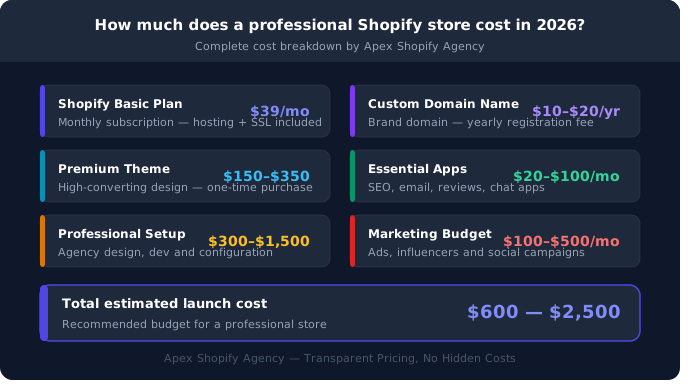
Understanding the full cost is essential before starting. This Shopify Store in 2026 — Complete Guide breaks down every expense you should expect.
| Cost Item | Estimated Cost |
| Shopify Basic Plan | $39/month |
| Custom Domain | $10–$20/year |
| Premium Theme | $150–$350 one-time |
| Essential Apps | $20–$100/month |
| Professional Setup | $300–$1,500 one-time |
| Marketing Budget | $100–$500/month |
Total Estimated Launch Cost: $600 — $2,500
Most new store owners budget between $200–$500 for a basic launch. However, investing in professional setup, premium design and proper marketing from day one delivers significantly better returns long term.
Cutting corners on design, SEO and store configuration always costs more to fix later than doing it right initially.
At Apex Shopify Agency, we offer complete Shopify store setup packages at competitive prices — covering everything from design to launch.
Our Shopify Store Development Services at Apex Shopify Agency
At Apex Shopify Agency, we provide everything you need to build, launch and grow a successful Shopify Store in 2026 — Complete Guide style — all under one roof.
Professional Shopify Store Setup & Development
Complete store setup from scratch — account configuration, payment gateways, shipping, apps and full launch support.
Custom Theme Design & UI/UX
Pixel-perfect custom themes designed for conversions, mobile responsiveness and outstanding user experience.
Branding & Visual Identity for Your Store
Logo design, color palette, brand guidelines and complete visual identity that makes your store instantly recognizable.
WordPress Development
Professional WordPress websites and landing pages built for speed, SEO and beautiful user interface design.
Social Media Management & Growth
Complete social media management including content calendar, posting schedule, audience engagement and consistent growth strategy.
Content Creation — Graphics, Videos & Creatives
High-quality social media graphics, video clips, GIFs, promotional banners and infographics that drive engagement and sales.
Why Choose Apex Shopify Agency as Your Shopify Partner?
There are hundreds of agencies out there — here is why businesses trust Apex Shopify Agency with their Shopify Store in 2026 — Complete Guide journey.
End-to-End eCommerce Solutions Under One Roof
From niche research to store launch — design, development, branding and marketing all handled by one dedicated team.
Expert Shopify Developers & UI/UX Designers
Our certified Shopify experts and UI/UX designers build stores that are visually stunning, technically solid and conversion-optimized.
Complete Branding — From Logo to Live Store
We handle everything — logo, color palette, brand guidelines and full store design — delivering a consistent professional brand identity.
Transparent Pricing — No Hidden Costs
Clear, upfront pricing with zero surprises. You know exactly what you are paying for before we begin.
Dedicated Support After Launch
Our relationship does not end at launch. We provide ongoing support, updates and growth consultation to keep your store performing at its best.
Our Shopify Store Development Process
At Apex Shopify Agency, we follow a proven six-step process that delivers professional results every time. Here is exactly how we build your Shopify Store in 2026 — Complete Guide from idea to launch.
Step 1 — Discovery & Strategy Session
We understand your business, niche, target audience and goals before writing a single line of code.
Step 2 — Branding & Design Prototyping
We create your logo, brand identity and store design prototype for your approval before development begins.
Step 3 — Shopify Development & Configuration
Full store development including theme customization, payment gateways, shipping, apps and SEO configuration.
Step 4 — Testing & Quality Assurance
Every page, link, checkout flow and mobile experience tested thoroughly before launch.
Step 5 — Launch & Handover
Your store goes live and we hand over full access with complete training and documentation.
Step 6 — Ongoing Support & Growth
Post-launch support, performance monitoring and growth strategy consultation included for every client.
Our Portfolio — Shopify Stores Built by Apex
Every store we build follows the same high standards outlined in this Shopify Store in 2026 — Complete Guide — professional design, optimized performance and conversion-focused structure.
Project 1 — Fashion & Beauty
A complete fashion and beauty store featuring custom theme design, mobile-first layout, product filtering and seamless checkout experience. Result — 40% increase in conversions within first month.
Project 2 — Home & Kitchen
A fully branded home and kitchen store with organized collections, optimized product pages, multiple payment gateways and automated shipping configuration. Result — launched in 7 days with zero technical issues.
Project 3 — Men Accessories
A premium men accessories store featuring custom UI/UX design, complete branding, social media integration and SEO optimization from day one. Result — ranked on Google within 30 days of launch.
What Our Clients Say About Apex Shopify Agency
Real results from real clients. Here is what businesses say after following our Shopify Store in 2026 — Complete Guide approach with Apex Shopify Agency.
Client 1 — Hair Salon / London
⭐⭐⭐⭐⭐ “Apex Shopify Agency transformed our online presence completely. Our store looks absolutely stunning and bookings increased by 60% within the first month. Highly recommended!” — Sarah Mitchell, London
Client 2 — Restaurant / New York
⭐⭐⭐⭐⭐ “Professional, fast and incredibly talented team. They built our online ordering store from scratch and delivered beyond our expectations. Best investment we made this year.” — James Rodriguez, New York
Client 3 — eCommerce Store / Phoenix
⭐⭐⭐⭐⭐ “From branding to launch — Apex handled everything perfectly. Our store ranked on Google within weeks and sales have been consistently growing ever since.” — Emily Carter, Phoenix
Frequently Asked Questions
Here are the most common questions about our Shopify Store in 2026 — Complete Guide.
Is Shopify good for beginners in 2026?
Yes. Shopify’s intuitive dashboard and guided setup make it perfect for first-time store owners with zero technical experience.
How long does it take to launch a Shopify store?
A basic store launches within 24–48 hours. A professional custom store typically takes 7–14 days.
Can you run a Shopify store without inventory?
Yes. Dropshipping and print-on-demand models allow you to sell products without holding any physical stock.
Can you sell digital products on Shopify?
Yes. eBooks, courses, templates and software are all sellable through Shopify using apps like Digital Downloads.
Is dropshipping still profitable with Shopify in 2026?
Yes. Dropshipping remains profitable when focused on trending niches, quality suppliers and optimized product pages.
Which is better in 2026 — Shopify or Amazon?
Shopify gives complete brand control while Amazon offers marketplace exposure. Most successful sellers use both platforms together.
Do you need a business license for Shopify?
In most countries yes. Always check local legal requirements before accepting payments and running advertisements.
How do you scale a Shopify store after launch?
Through multi-channel marketing, CRO testing, loyalty programs, influencer collaborations and upgrading to Shopify Plus.
Can AI help create a Shopify store?
Yes. Shopify Magic generates product descriptions, automates emails and suggests designs — but human strategy remains essential.
Ready to Launch Your Professional Shopify Store with Apex?
You now have everything you need from this Shopify Store in 2026 — Complete Guide — but knowing the steps and executing them perfectly are two very different things.
Building a professional, high-converting Shopify store requires the right expertise, tools and strategy working together seamlessly.
That is exactly what Apex Shopify Agency delivers.
What You Get With Apex:
- ✅ Complete store setup from scratch
- ✅ Custom professional design
- ✅ Full branding and visual identity
- ✅ SEO optimization from day one
- ✅ Payment and shipping configuration
- ✅ Post-launch support and growth consultation
Do not waste months figuring it out alone. Let our expert team build your dream Shopify store — fast, professionally and at transparent pricing.
Contact Apex Shopify Agency today and get your free consultation.
Your professional Shopify store is just one conversation away.